
Anyone scheduling service jobs in an electrical or building technology company often works with Outlook or another calendar. That makes sense: the calendar is there anyway, everyone knows it, and an appointment is created in ten seconds.
For a handful of service technicians this works well. The question is what happens when there are more of them, and when each has many short jobs a day.
Where shared calendars reach their limits
The problem does not start with a single calendar, it starts with the sum of them. Once a service manager has ten shared calendars displayed at the same time, the view becomes unreadable. Every calendar brings its own colour, appointments overlap, and private entries sit next to customer appointments.
At its core, the service manager does not want to know what one person is doing on Thursday, but who still has room on Thursday afternoon. Reading that out of a list of appointments stays tedious, and this applies to calendars as much as to scheduling tools.
Dispatching runs alongside everything else
There is another point that costs more time in daily work than readability. Dispatching in the calendar is usually disconnected from the other systems. Sometimes there is an interface, often there is not, and then service jobs are recorded a second time: once where they originate, and once in the calendar.
This does not only cost time, it separates information that belongs together. Projects run in one system, service jobs in the calendar, and the workload of the entire team results from both. Nowhere is it fully visible.
It therefore makes sense to keep workload, projects and service work in the same place. That is what we are working towards.
Our previous view was not built for this either
To be honest, this point applies to us as well. Our previous service view was not really designed for service scheduling. It showed assignments on a horizontal time axis, which works well for project work with a few long blocks.
With service work it breaks down. One job from 09:00 to 09:20, the next at 09:50, half an hour of travel time in between: on a horizontal axis these become three narrow strips that are hard to tell apart. Start time, sequence and above all the free gaps in between disappear visually.
Yet it is precisely those gaps that decide whether a short-notice job can still be fitted in on the same day.
How we are rebuilding the service view
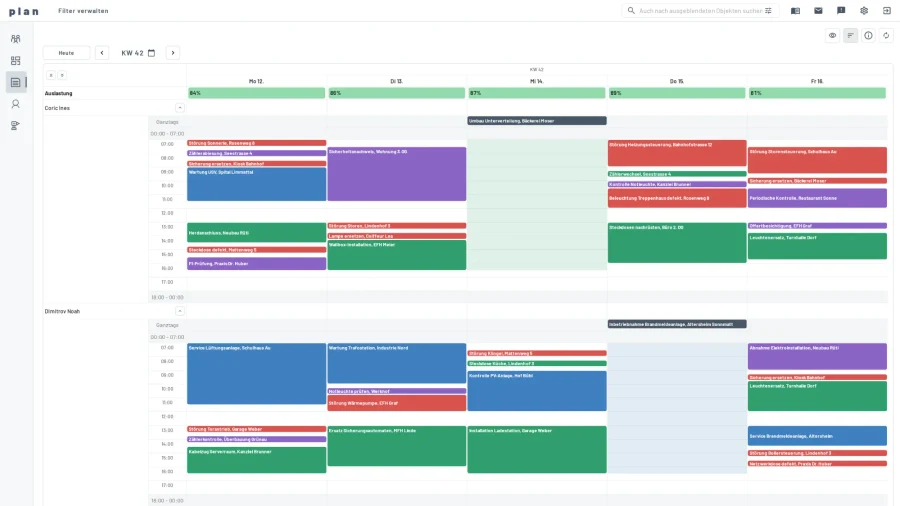
We are currently replacing the previous view with a weekly view for service work. It shows Monday to Friday, employees below one another, and time runs vertically instead of horizontally. The height of a job therefore matches its duration, and the free gaps in between become visible.
Workload runs along per day, and scheduling happens directly in this view: move, adjust duration, copy. Service jobs, projects and absences appear together, because only that combination gives a reliable picture of availability.
Available with the next release
The service week arrives with the next release. The image above shows the current state from development.
That does not conclude our work on service scheduling, it starts it. We will keep developing it step by step, with the goal of making scheduling and dispatching as efficient as possible in daily work. For that we depend on feedback from practice: if you schedule service jobs and want to tell us where it gets difficult for you, we are listening. Conversations exactly like that prompted this view.